







- A paperless office replaces suitable paper-based activities with digital processes for capturing, approving, signing, storing, and retrieving business documents.
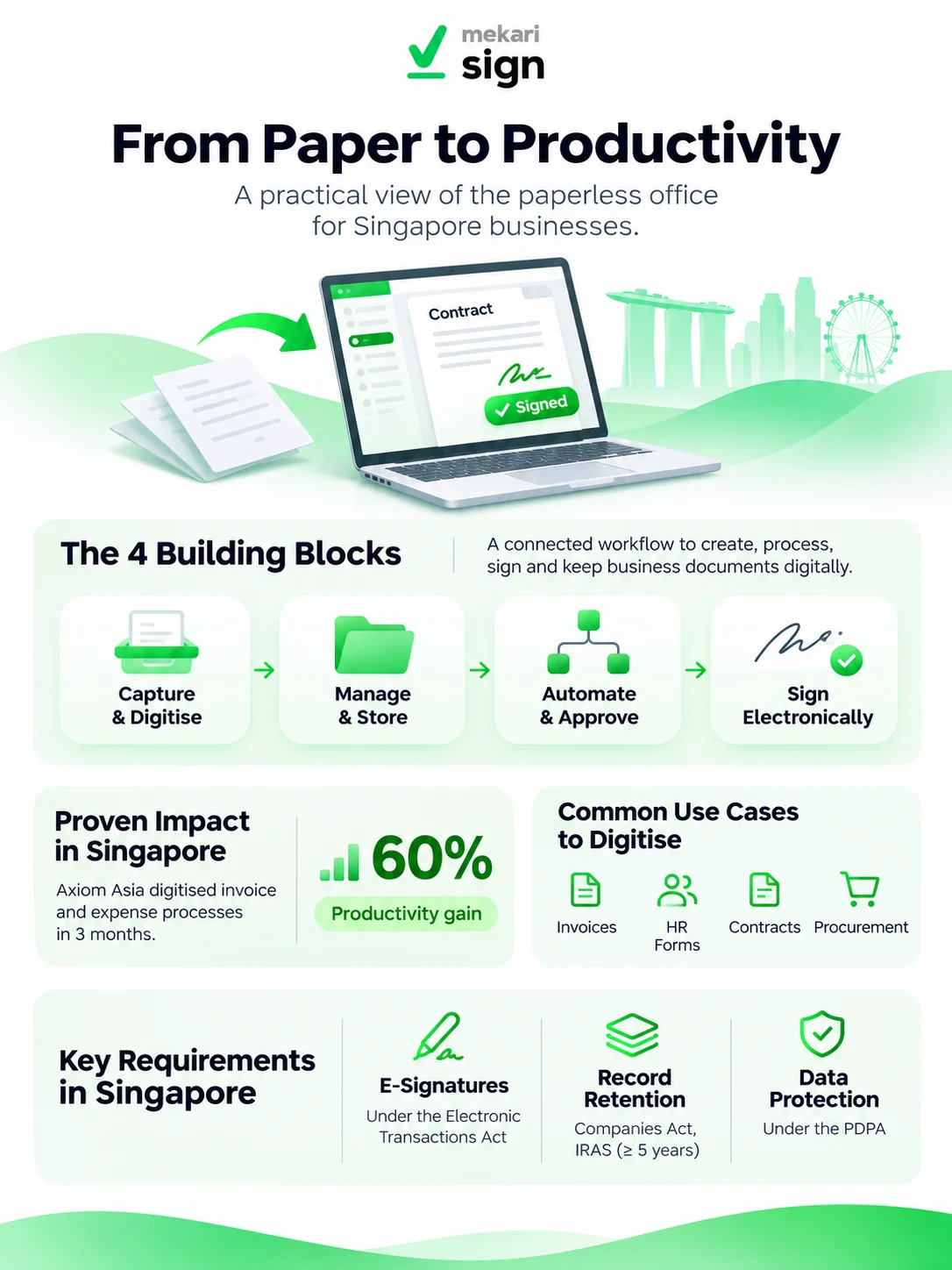
- A Singapore case study involving Axiom Asia reported a 60% productivity gain in supplier invoice and employee expense-claim processing after a three-month transition to paperless workflows.
- Document capture, document management, workflow automation, and electronic signing are four capabilities that support a paperless office.
- Singapore businesses should consider the Electronic Transactions Act, Companies Act record-retention requirements, IRAS guidelines, and PDPA obligations when digitising records.
- Explore Mekari Sign’s Singapore platform for contract management, document tracking, Singpass signing, and bulk document workflows.
Finance teams can spend hours entering supplier invoice details, checking supporting records, and chasing approvals before payments are processed. Deloitte’s study of in-house Finance and Accounting functions in Singapore reports that fund manager Axiom Asia achieved a 60% productivity gain in supplier invoice and employee expense-claim processing after integrating OCR and machine learning with its accounting systems and completing a three-month transition to paperless processing.
A paperless office is a document-management approach that enables businesses to capture, organise, approve, sign, and retrieve records such as invoices, contracts, HR forms, and purchase orders electronically. This guide explains the technologies involved, practical applications across departments, implementation steps, and Singapore requirements to consider when digitising business records.
What Is a Paperless Office?
A paperless office is a workplace where employees manage business records through digital processes instead of relying on printed documents and physical filing systems. These processes can cover document creation, data capture, review, approval, signing, storage, and retrieval.
Some businesses create documents digitally from the beginning. Others still receive physical invoices, receipts, or forms before scanning them into their systems. In these cases, the original document may start on paper while subsequent processing takes place electronically.
The level of digitisation depends on the document type and the business requirement. Companies may still need to retain physical originals when a law, contract, or operational process requires them. A paper-light approach is often a more practical starting point than attempting to eliminate every physical document.
What Are the Four Components of a Paperless Office?
A paperless office relies on several connected capabilities. Each supports a different stage of the document lifecycle.
1. Document capture and digitisation
Document capture converts information from physical or digital sources into files that business systems can process.
Common methods include:
- Scanning physical documents into PDF files.
- Using digital forms to collect employee, supplier, or customer information.
- Capturing invoices and receipts through mobile devices.
- Using optical character recognition (OCR) to extract text and information from scanned documents.
OCR can reduce manual data entry, especially when a Finance team processes recurring supplier invoices. However, employees should still validate extracted information before approving payments or updating accounting records. Inaccurate supplier details or invoice amounts can create downstream errors.
2. Document management and storage
Digitised files need a consistent structure. A central document repository helps employees locate records without searching through email attachments, personal drives, and physical filing cabinets.
A document management system may provide:
- Searchable document names and metadata.
- Folder structures and document categories.
- Version control and access permissions.
- Document activity records and audit trails.
- Retention and archival controls.
An Electronic Document Management System (EDMS) supports these activities by helping businesses organise and control digital records. Read our guide to Electronic Document Management Systems for a closer look at its functions and business applications.
3. Digital workflows and approvals
Paper documents often move between employees through physical handovers or email attachments. A digital workflow can assign documents to reviewers, notify approvers, and record decisions in a structured process.
For example, a supplier invoice may move from Accounts Payable to a department manager for approval, then to Finance for payment processing. Each person can review the relevant information through the assigned workflow instead of passing a physical document between desks.
Businesses handling recurring agreements can also use contract management automation to organise contract requests, reviews, approval routing, signing, and renewal reminders.
4. Electronic signing and record retention
Documents that require signatures can move through an electronic signing process when the applicable legal and contractual requirements permit it. Businesses can retain the completed record with relevant signing information and activity history.
Record retention needs its own policy. Employees should know where completed documents belong, who may access them, and how long the business must retain each record.
Electronic signing and storage should work together with the company’s approval and document-control procedures. A signed PDF stored in an employee’s personal email account may still be difficult for the business to retrieve or manage.
How Did Axiom Asia Implement a Paperless Process in Singapore?
Deloitte’s Study on in-house Finance and Accounting functions in Singapore, commissioned by EDB, SAC, and WSG, documents how fund manager Axiom Asia digitised its Accounts Payable processes.
The company integrated optical character recognition (OCR) and machine learning (ML) with its core accounting systems to reduce manual processing.
| Process | Previous approach | Digitised approach |
|---|---|---|
| Supplier invoices | Hard-copy invoices handled manually | OCR and ML processed invoice information through connected accounting systems |
| Employee expense claims | Physical receipts and manual submissions | Employees scanned receipts using mobile devices and submitted claims electronically |
Reported results:
- Completed the transition to paperless processing in three months.
- Achieved a 60% productivity gain in supplier invoice and employee expense-claim processing.
- Improved reimbursement turnaround and made expense submission more convenient for employees.
For businesses considering a similar approach, Axiom Asia’s experience provides a practical starting point: identify recurring document-handling tasks, automate data capture, and connect the process to existing business systems.
What Are the Benefits of a Paperless Office?
1. Reduce document processing time
Printing, collecting signatures, scanning, and sending documents between departments can delay routine business activities. Digital workflows allow employees to review and approve records online without arranging physical handovers.
For example, an HR team can send an employment agreement to a new employee for electronic signing. The employee can complete the required steps remotely, subject to the document’s signing requirements.
2. Retrieve records faster
Employees can search a central digital archive using document names, dates, categories, or other metadata. This makes it easier to locate supplier agreements, employee records, invoices, and completed contracts.
Legal and Finance teams can also retrieve supporting records when management or auditors request them.
3. Improve document control
Several copies of the same document can create confusion over which version contains the approved terms. A managed repository helps employees identify the relevant version and access records according to their assigned permissions.
Activity records also help businesses check who reviewed or approved a document and when an action took place.
4. Reduce printing and physical storage expenses
Paper, ink, printer maintenance, filing equipment, and document delivery create recurring expenses. Digitising suitable processes can reduce these costs and free up office space used to store physical records.
Businesses should still compare these savings against software subscriptions, implementation, employee training, and digital storage costs. The financial return depends on the volume of documents and the processes being replaced.
5. Support collaboration across locations
Employees working from different offices can access authorised documents through a shared digital system. Managers can review and approve requests without waiting for physical copies to arrive.
This arrangement can benefit companies with multiple branches, remote employees, and external partners in different locations. Access permissions should still reflect each person’s responsibilities.
Which Business Processes Should You Digitise First?
Start with departments that handle recurring documents, repeated approvals, or frequent physical handovers. The following examples show where digital workflows can replace common paper-based activities.
| Department | Common documents | Example digital workflow |
|---|---|---|
| Finance | Supplier invoices, expense claims, purchase orders | Capture invoice data, validate supporting records, route approvals, and retain the completed transaction records. |
| Human Resources | Employment contracts, onboarding forms, policy acknowledgements | Prepare employee documents, collect information, obtain approval and signatures, and store completed records. |
| Legal and Procurement | NDAs, supplier agreements, service contracts | Review contract versions, obtain internal approval, collect signatures, and monitor important contract dates. |
| Sales | Proposals, customer agreements, order forms | Prepare documents, obtain internal approval, send agreements to customers, and monitor signing progress. |
| Operations | Inspection forms, internal requests, service reports | Collect information through digital forms, assign tasks, record decisions, and store completed records. |
Finance teams with high invoice volumes may benefit from starting with Accounts Payable. Companies processing many employee contracts or supplier agreements may find greater value in digitising HR or Procurement workflows first.
How to Create a Paperless Office in Six Steps
1. Audit your existing document processes
Identify which documents employees print, sign, scan, send, and store. Map the people involved and record the time each process takes.
Useful baseline measurements include monthly printing costs, approval cycle time, document retrieval time, and the number of incomplete or misplaced records.
2. Prioritise high-volume processes
Choose a process that involves recurring documents or repeated manual work. Supplier invoices, employee onboarding, and routine contract signing are practical starting points.
A smaller pilot makes it easier to identify workflow gaps before expanding the project to other departments. Avoid changing every process at the same time.
3. Establish document management rules
Define how employees should name, categorise, store, and retrieve digital files. Assign a document owner and determine who can view, edit, approve, or download each record.
Set retention periods based on the document’s purpose, business requirements, and applicable Singapore regulations. Include a process for handling outdated or duplicate files.
4. Select suitable document management tools
Choose systems that support the document activities your business needs. Depending on the workflow, these may include:
- Document scanning and OCR for paper-based records.
- Centralised storage and searchable document archives.
- Version control and role-based access.
- Approval routing and workflow notifications.
- Electronic signing and audit trails.
- Integration with accounting, HR, and other business systems.
Check whether the tools connect to existing business applications. Employees should not have to enter the same supplier, customer, or employee information into several disconnected systems.
5. Train employees and test the workflow
Introduce the new process to employees who handle the selected documents every day. Explain how to upload files, review information, request approval, sign documents, and retrieve completed records.
Test the workflow using actual business documents. Include exceptions such as incorrect invoice information, rejected approvals, missing supporting records, and documents that still require physical handling.
6. Measure the results and expand gradually
Compare pilot results with the original baseline. Check whether employees spend less time processing documents, whether approval delays have decreased, and whether records are easier to retrieve.
Expand the project to other departments once the workflow works reliably. Review the process when business requirements or applicable regulations change.
What Should Singapore Businesses Check Before Going Paperless?
Before digitising business records, Singapore companies should review three areas: electronic signature requirements, record retention, and personal data protection. These determine how businesses can execute, store, and manage digital records.
1. Electronic signatures under the Electronic Transactions Act 2010
Section 8 of Singapore’s Electronic Transactions Act 2010 (ETA) recognises electronic signatures when the method identifies the signer, indicates their intention, and meets the required reliability standard.
However, certain matters are subject to statutory exclusions or specific execution requirements. The ETA First Schedule identifies matters excluded from Part 2, while its new Part 2B provides a framework for qualifying electronic conveyancing transactions through prescribed systems. The relevant amendments took effect on 19 November 2026.
Businesses should check the document type and applicable execution requirements before replacing physical signatures with electronic ones.
2. Document retention under Singapore regulations
Storing records electronically does not remove statutory retention obligations. Companies should consider the following requirements when setting up their document retention policies.
| Regulation | Key requirement |
|---|---|
| ETA, Section 9 | Electronic records must remain accessible, accurately represent the original information, and retain relevant information about their origin, destination, and transmission date and time. |
| Companies Act 1967, Section 199 | Companies must retain accounting and related records for at least five years from the end of the financial year in which the relevant transactions or operations were completed. |
| IRAS record-keeping requirements | Companies must retain relevant tax records, source documents, and accounting records for at least five years from the relevant Year of Assessment (YA). |
The Companies Act and IRAS use different starting points for calculating their five-year retention periods. Finance teams should account for both when deciding when records can be disposed of.
3. Personal data protection under the PDPA
Digital business records may contain employee, supplier, and customer information. Singapore’s Personal Data Protection Act (PDPA) sets requirements for protecting and managing this information.
- Section 24, Protection: Organisations must implement reasonable security arrangements to prevent unauthorised access, disclosure, or loss of personal data.
- Section 25, Retention: Personal data must no longer be retained when its original purpose is no longer being served and there is no remaining legal or business need.
- Section 26, Overseas transfers: Organisations transferring personal data outside Singapore must ensure a comparable standard of protection under the prescribed requirements.
When choosing a cloud document provider, review its data hosting locations, sub-processors, access controls, and Data Processing Agreement (DPA). For example, Mekari Sign’s Trust Center discloses its Indonesia-based data hosting and relevant sub-processor arrangements, which Singapore businesses should assess as part of their vendor and cross-border data transfer reviews.
How Mekari Sign Supports Paperless Document Workflows
Contracts and business agreements often involve several steps before completion. Legal may review the terms, a manager may need to approve the document, and authorised signers must complete the signing process.
Mekari Sign supports the contract and signing stages of a paperless office through several capabilities:
- Contract Management: Store signed agreements in a searchable library, monitor contract status, and set reminders for important contract dates.
- Singpass and WhatsApp Signing: Send signing links through WhatsApp and facilitate Singpass-based identity verification and signing.
- Bulk Sign: Send and process multiple documents in a batch for recurring requirements such as payslips, NDAs, and year-end letters.
- API Integration: Connect electronic signing workflows with existing HRIS, CRM, and internal business systems.
For Singpass-based signing, the signer is redirected to the Singpass platform to complete the document execution process. Mekari Sign facilitates this handoff and serves as the associated document repository, as described in its Trust Center.
Mekari Sign is suited to the contract management and signing part of a paperless office. Businesses may still need separate accounting, invoice-processing, or broader records-management systems for other activities.
To discuss your document workflows, contact the Mekari Sign Singapore team.