





















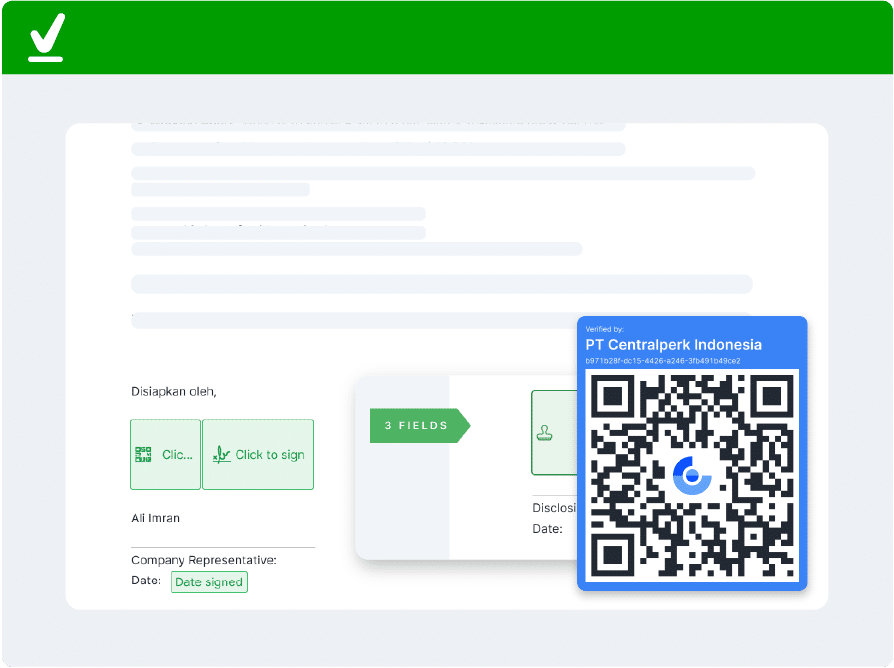
Certified Electronic Stamps

Enhance document's validity
with legal and official
electronic stamps

  • Create and customize e-Stamp to suit your needs
  • Officially certified and authorized by Kominfo
  • Easy and fast digital document stamping
  • Unique QR codes to avoid the risk of forgery
Images by Mekari e-sign

35,000+ companies across various industries trust Mekari's products

Mamikos merupakan salah satu klien Mekari Sign
TRINITILAND merupakan salah satu klien Mekari Sign
Indosat merupakan salah satu klien Mekari Sign
Amartha merupakan salah satu klien Mekari Sign
Kulina merupakan salah satu klien Mekari Sign
SPIE merupakan salah satu klien Mekari Sign
Quipper merupakan salah satu klien Mekari Sign
Foresthree merupakan salah satu klien Mekari Sign
Stockbit merupakan salah satu klien Mekari Sign
JD.ID merupakan salah satu klien Mekari Sign
Scopus merupakan salah satu klien Mekari Sign
Mixue merupakan salah satu klien Mekari Sign
Zekindo merupakan salah satu klien Mekari Sign
HEBEBEAUTY merupakan salah satu klien Mekari Sign
Aido Health merupakan salah satu klien Mekari Sign
dot merupakan salah satu klien Mekari Sign

How to create an electronic stamp with Mekari Sign

Create Mekari Sign e-Stamp in 5 Easy Steps

Complete your important documents with Mekari Sign’s electronic stamp. Customize to match your company’s branding and stamp easily:
Step 1
Visit the Mekari Sign dashboard
Log into your Mekari Sign account, go to the "Settings" menu, and click "Account." Then, select "Corporate Stamp."
Step 2
Click "Create stamp"
On the corporate stamp page, click the "Create stamp" button at the top right to continue.
Step 3
Set up company information
You will be directed to the e-Stamp creation page. Enter your company name and website in the available fields.
Step 4
Customize the color & logo
Upload your company’s logo and choose the desired stamp color. Customize the stamp based on your branding.
Step 5
Place or stamp on the document
Place the e-Stamp field on the document, then apply it by selecting the stamp you want to use.
Log into your Mekari Sign account, go to the "Settings" menu, and click "Account." Then, select "Corporate Stamp."
On the corporate stamp page, click the "Create stamp" button at the top right to continue.
You will be directed to the e-Stamp creation page. Enter your company name and website in the available fields.
Upload your company’s logo and choose the desired stamp color. Customize the stamp based on your branding.
Place the e-Stamp field on the document, then apply it by selecting the stamp you want to use.
bulk stamp e-meterai

What is an Electronic Stamp?

e-Stamp is a digital stamp that can be created and stored electronically. e-Stamps typically contain company information, such as the company name, logo, and registration number.

Some e-Stamps also include a unique code or QR code to enhance security and facilitate verification.

How e-Stamps Help Authenticate Documents

Mekari Jurnal
Legitimate Verification Tool

e-Stamps serve as a legitimate and valid verification medium.

Mekari Jurnal
Customizable Stamps

Customizable e-Stamps to match company’s branding.

Mekari Jurnal
Easy & Efficient

Cclick and stamp digitally, without additional tool & ink.

Mekari Jurnal
Detailed & trackable

Shows detailed document activity with a scannable QR format

Legal Basis in Indonesia

The legality of e-Stamps is regulated under Government Regulation No. 71 of 2019 on the Implementation of Electronic Systems and Transactions.
It is emphasized that electronic stamps are legally equivalent to conventional stamps and are legally binding as they have an electronic certificate.

Comparison of Wet Stamps vs Electronic Stamps (e-Stamps)

Key Features

Document Security
Workflow Efficiency
Authenticity Validation
Operational Costs
Conventional

Wet Seal

Document Security
High risk of forgery and physical manipulation
Workflow Efficiency
Manual process; requires physical delivery via courier
Authenticity Validation
Requires manual visual inspection
Operational Costs
High costs for paper, ink, and shipping logistics
e-Stamp

Electronic Stamp

Document Security
Protected by digital encryption and electronic certificates
Workflow Efficiency
Automated Process; instant delivery via cloud or email
Authenticity Validation
Instant verification via a unique QR Code scan
Operational Costs
Cost-Efficient; zero printing and delivery expenses

Highly secured Digital Signatures

Mekari Sign complies with the legal requirements for secure digital signatures

Adobe Approved Trust List (AATL)
Entrusted with Singpass Verification
Licensed by Trustgate Certificate Authority (CA)
Frequently Asked Questions (FAQ)

What is the Electronic Stamp feature?

An electronic stamp is the digital form of a manual stamp or seal.

Its function and use are the same as a manual stamp, which is to create stronger validity or legality of a document.

How to use the Electronic Stamp (e-Stamp)?

After creating the e-Stamp, you can stamp them in the documents as you would fix the e Signature:

  • Open the document you want to stamp
  • Click the provided e-Stamp fields
  • Choose the e-Stamp you want to use, then click “Sign”
  • Done! e-Stamp is successfully stamped in the document

Electronic stamp (e-Stamp) from Mekari Sign is valid and safe to use. The e-Stamp comes with a unique code for authenticity verification, either through government systems or Mekari Sign’s verification feature. Additionally, Mekari Sign employs high-standard security systems to protect the e-Stamp and digital documents from misuse, ensuring safety in its use. Thus, Mekari Sign’s e-Stamp is both legally valid and secure for digital document transactions.

You can upload your company logo, include the company name, and change the e-Stamp color in the “Settings” menu within the Mekari Sign app.

You can also create multiple e-Stamps within a single company account, such as differentiating e-Stamps by department or division, or for other functions.

The QR Code on the e-Stamp is a set of automatically generated codes, unique and random for each e-Stamp, making it difficult to forge.

In addition, the e-Stamp can be scanned to view a detailed audit trail of the document that has been stamped.

Yes, e-Stamps and electronic signatures serve different purposes. If you wish to sign a document on behalf of an individual, you still need to apply an electronic signature.

Accelerate your business growth with Mekari Sign

Accomplish more without compromising accuracy or speed with Mekari’s solutions, trusted by thousands of businesses.

WhatsApp WhatsApp Sales